Selected work04AI support · Product Designer @ Chams Access
Helpnest.Closing the gap between bot and human.
An AI-native support platform that blends intelligent triage, seamless human escalation and cross-product analytics into one workspace, for B2B teams who can't choose between speed and context.
- Role
- Product Designer @ Chams Access
- Timeline
- 2025 · 8 weeks
- Scope
- User research · 30+ dashboard screens
- Surfaces
- Admin and Super-admin web dashboards
- 01The problem
- When a bot hands a conversation to a human, the context disappears. Every escalation starts from zero.
- 02The bet
- Treat the handoff as a first-class design problem, not an afterthought, and design everything else around it.
- 03My role
- Product designer: extensive user research, then the Admin and Super-admin dashboards end to end.
- 04The outcome
- 30+ dashboard screens across eight surfaces, from the live agent console to the escalation rules.
01Context
Every escalation started from zero.
Bots resolve the common questions. But the moment a conversation needs nuance, the handoff to a human erases everything before it. Agents walk into escalations blind, managers can't see which products cause the most friction, and customers feel the gap.
Helpnest was designed from the ground up to close that gap, by treating the bot-to-human transition as the core design problem.
The best escalation is the one the customer never notices has happened.
02Problem
Five failures, five transitions.
- 01Context dies at escalation.When the bot hands off, the thread resets. The agent can't see what the customer already tried, what the bot explained, or how long they've waited.
- 02The queue has no priority.A failed payment blocking someone's pension contribution sits in the same undifferentiated queue as a routine password reset.
- 03Performance is invisible.Resolution rates, response times and satisfaction scores live in separate reports, if they exist at all, so managers have no unified view across products.
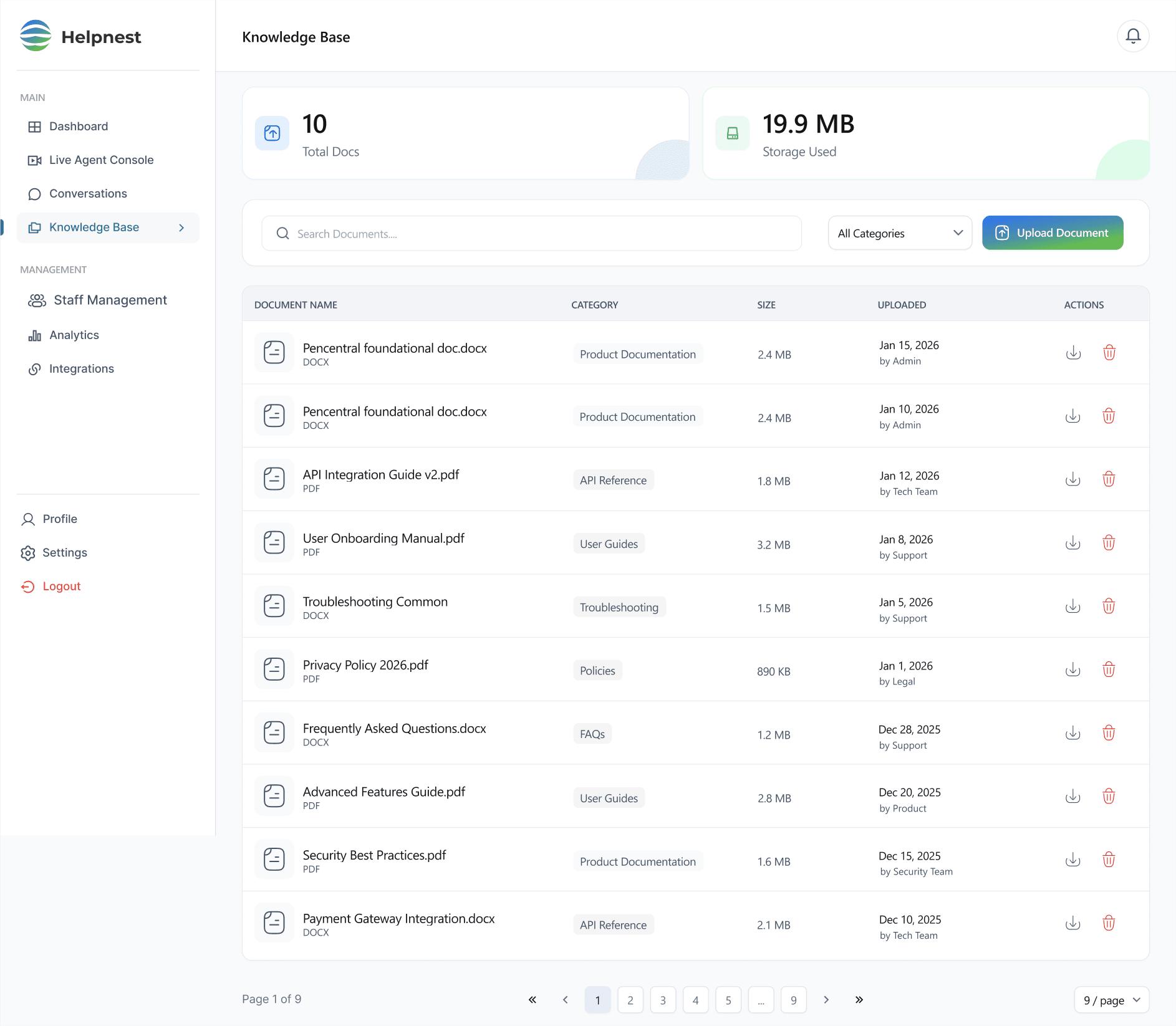
- 04Knowledge lives outside the flow.Agents switch tabs to find documentation while customers wait, which adds delay and makes answers inconsistent.
- 05Escalation is reactive.Conversations escalate after customers have already said they're frustrated. By then, satisfaction is gone.
03Research
Three roles, one shared surface.
The research covered the people on both sides of a support conversation, and the person managing everyone in it.
Works the queue
Support agent
“Everything I need, without switching tabs.”
Handles live conversations across several client products. Time to first response is the main pressure, so the queue, history, knowledge base and chat must sit together.
Runs the team
Support manager
“Data I can act on, not just dashboards.”
Monitors team performance, configures escalation logic and reviews analytics across products, to make staffing and policy decisions quickly.
Asks for help
End customer
“A fast answer, from whoever has it.”
Meets Helpnest through the chat widget. The product succeeds when they don't notice the switch from bot to human.
04Thinking
Designing for the second between bot and human.
- 01Carry context forwardOne constraint shaped everything: the handoff must carry context forward, not drop it. The agent sees the current issue, full history and activity timeline before typing a word.
- 02Triage from the listThe queue was redesigned around priority, so agents can triage from the list without opening each conversation, which cuts first-response lag.
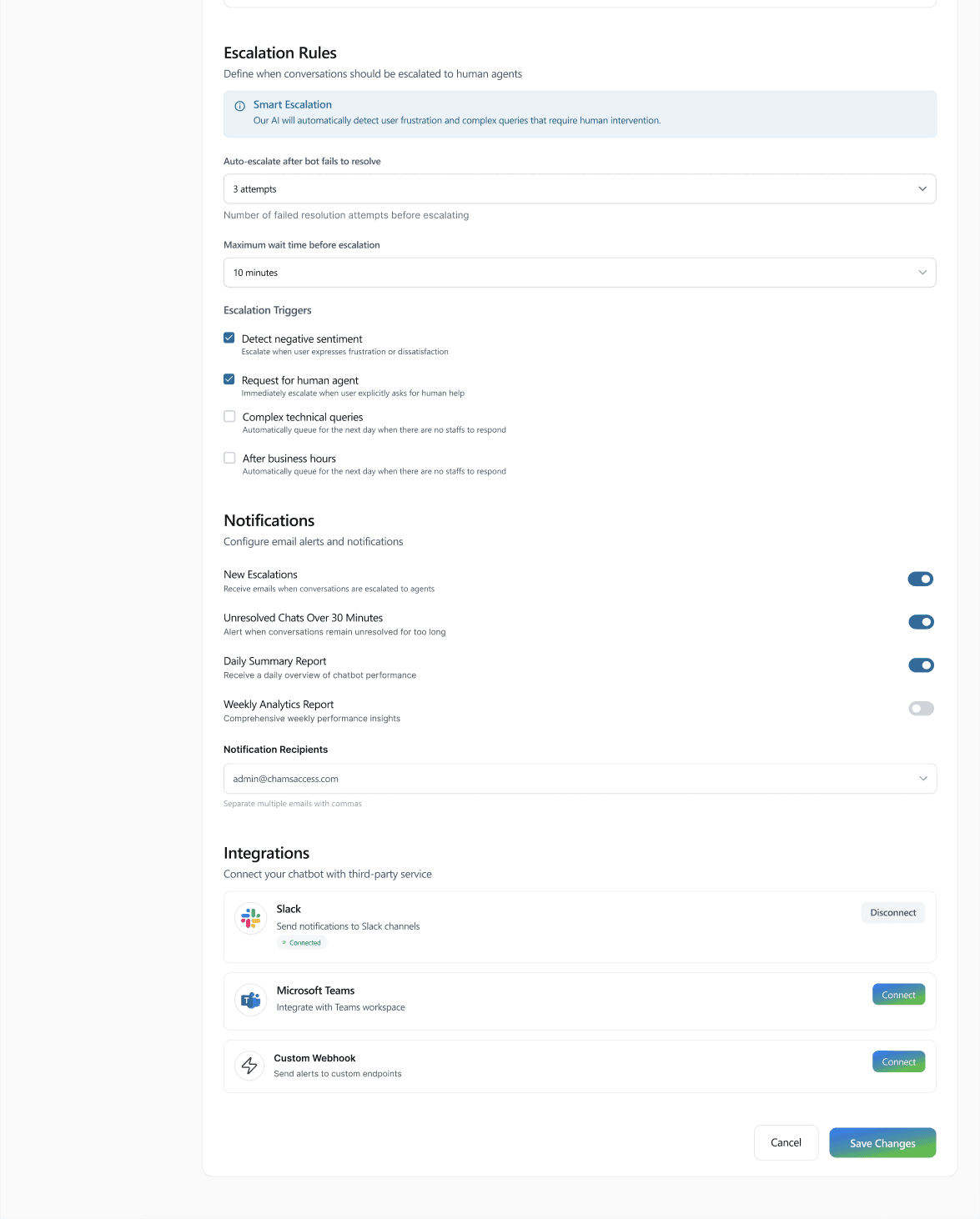
- 03Escalate before frustrationEscalation rules watch for negative sentiment, repeated failed attempts and wait time, so a human steps in before the customer gives up.
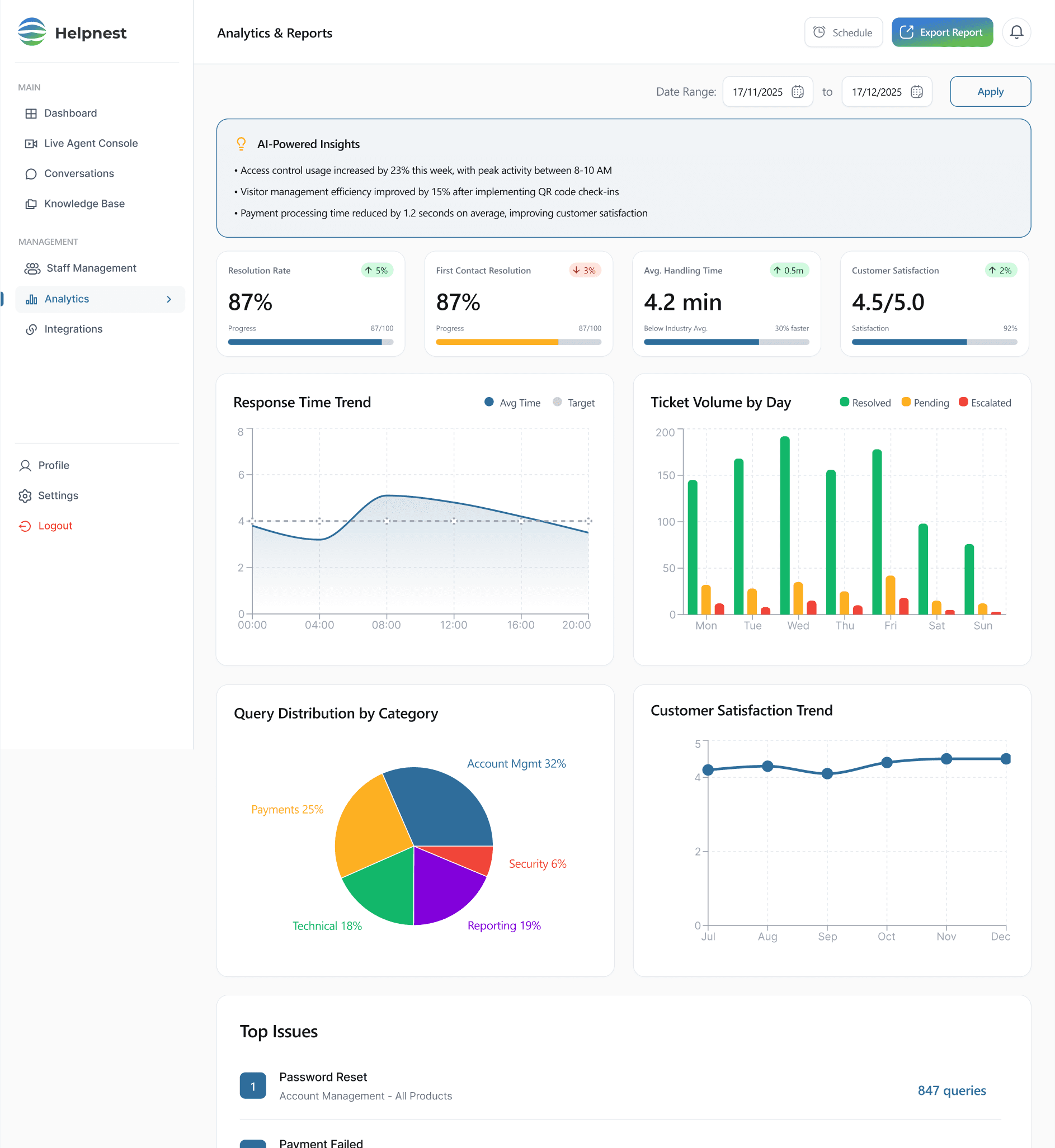
- 04Insights before chartsAnalytics follow a manager's real decision loop: AI-written insights about anomalies come first, raw charts second, and everything exports to PDF, Excel or CSV.
05Design
Eight surfaces. One coherent workspace.
Live agent console
Queue, context and chat, in one uninterrupted view.
The moment of handoff, designed. The conversation the agent inherits already shows the bot's attempt, when it escalated and when the agent joined.
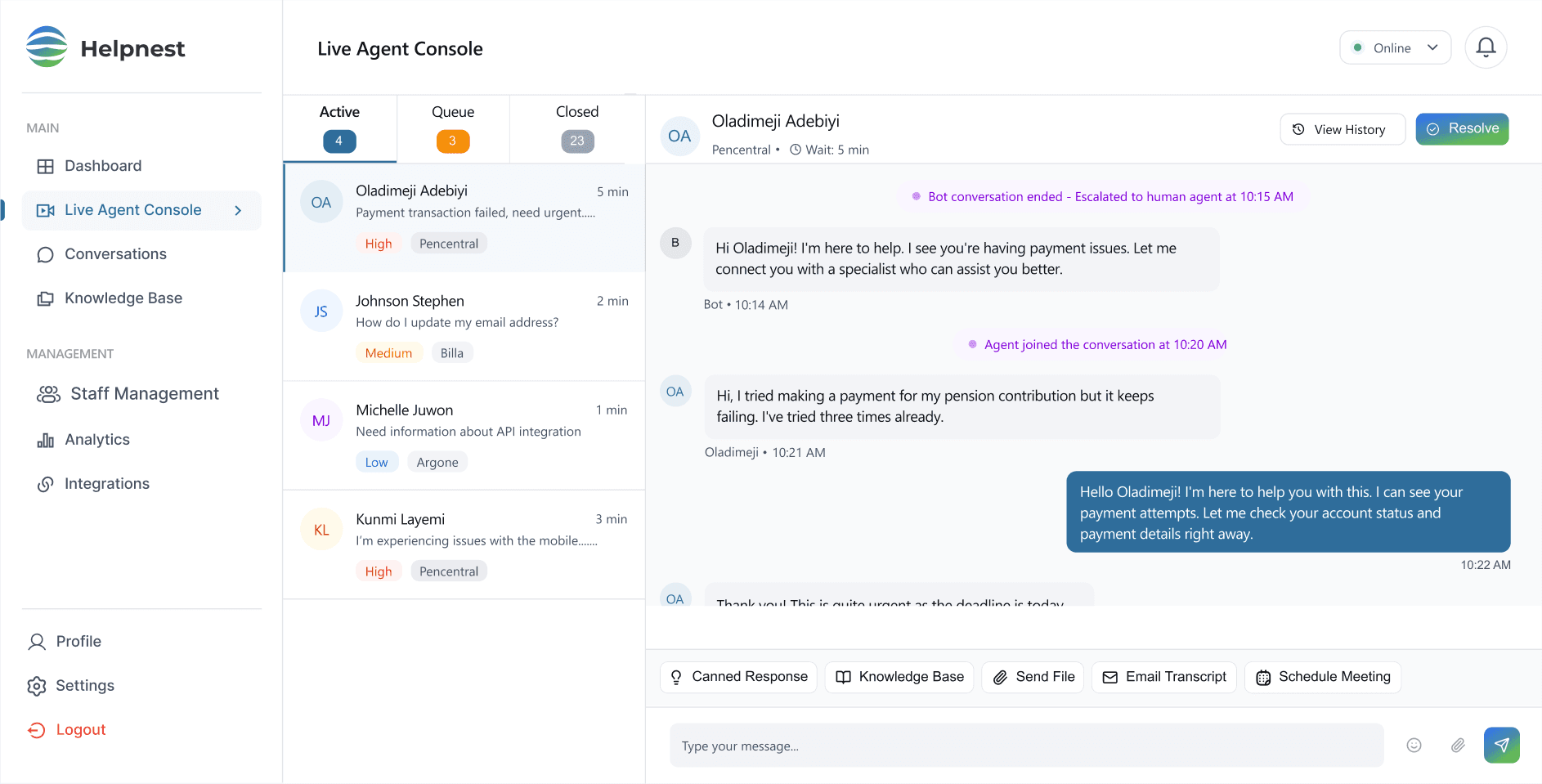
The live agent console, with four annotated details.
1Triage before opening
Every queued conversation shows product, wait time and a priority badge, so the urgent one is obvious from the list.
2The handoff, on the record
The thread marks when the bot escalated and when the agent joined, and keeps the bot's messages in view.
3History, one tap away
Wait time sits in the header, and the customer's full history opens without leaving the chat.
4Answers inside the input
Canned responses, the knowledge base and file sharing live where the agent types, not in another tab.
Conversation history
A customer's full record, before you say hello.
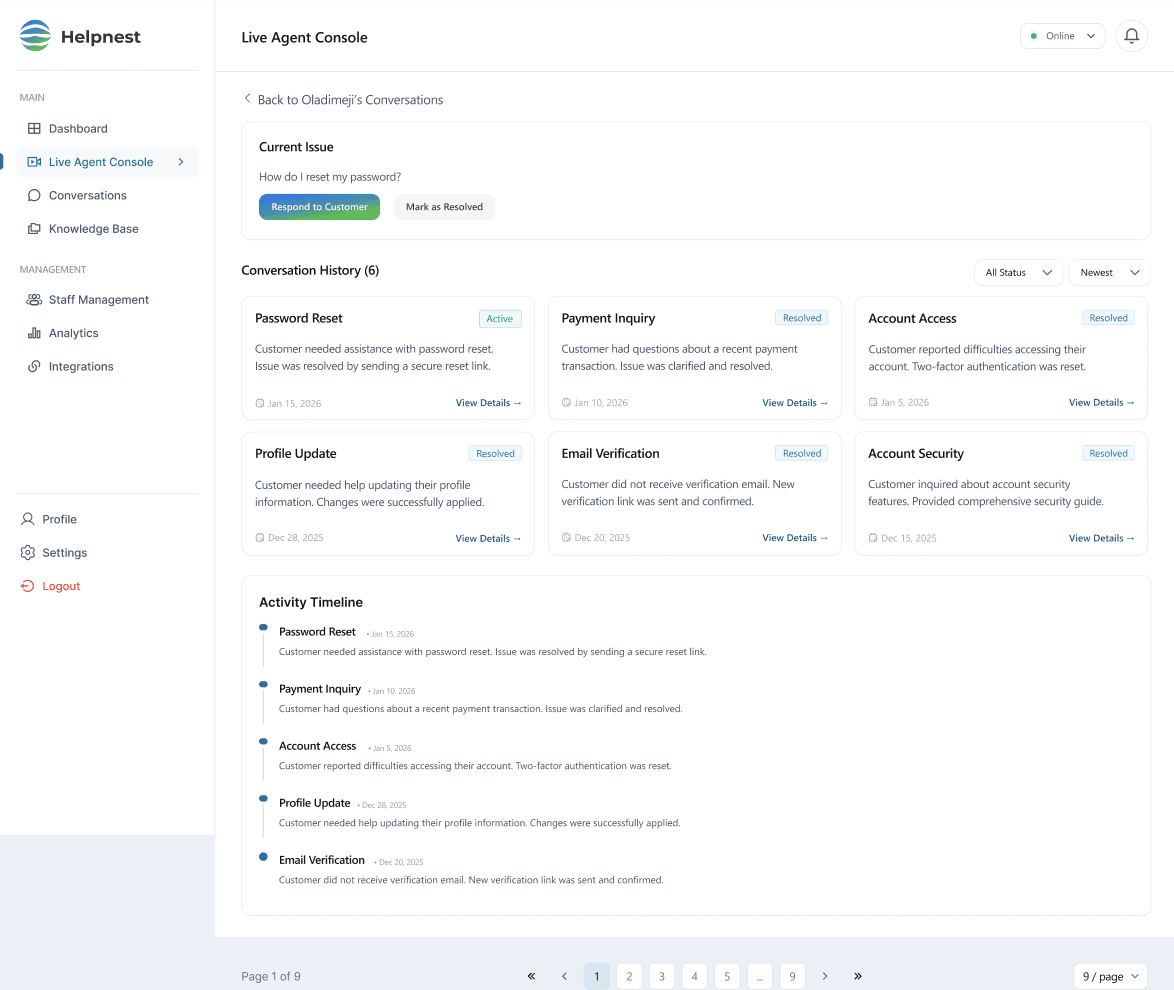
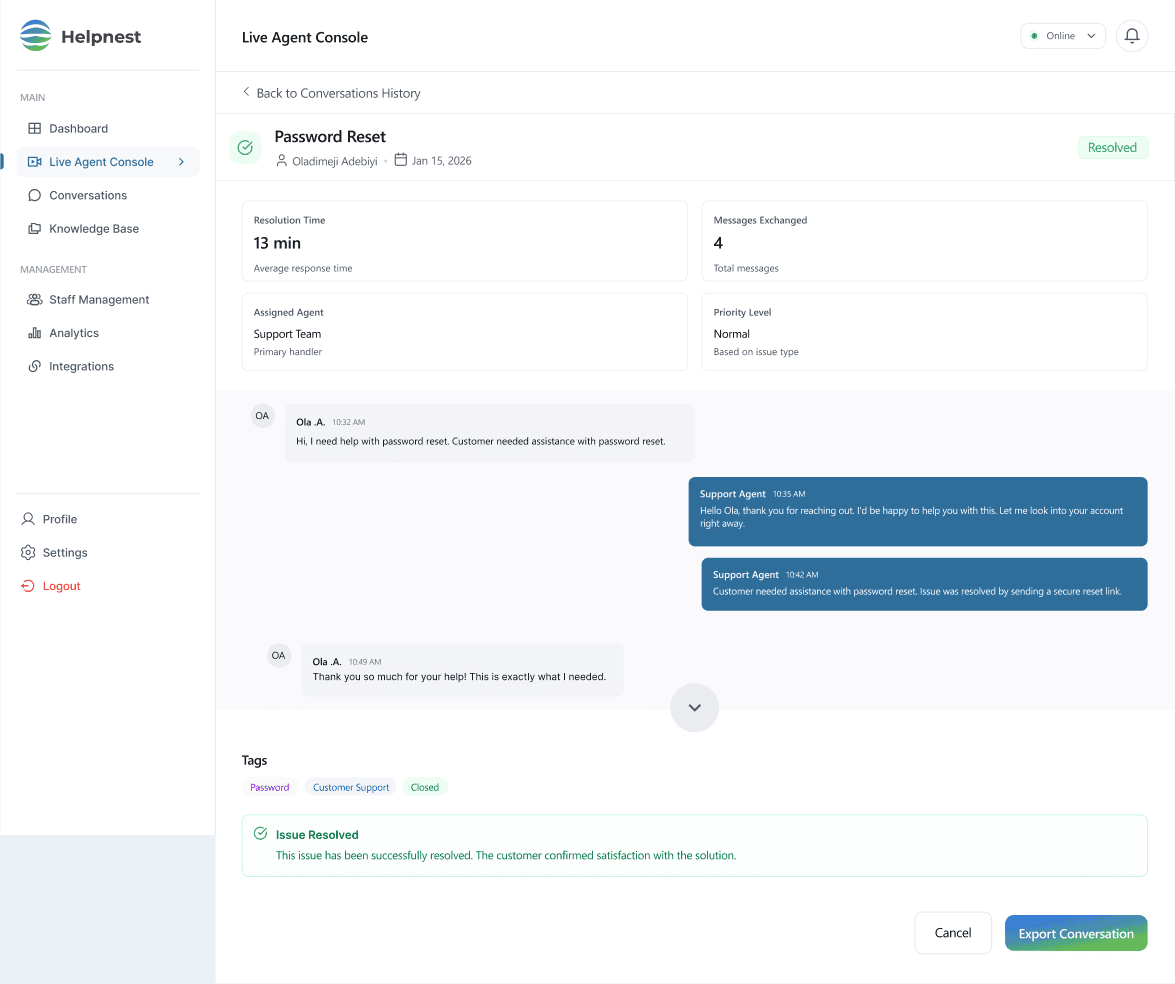
Every past ticket as a card with status, summary and date, then the full thread of any one of them: resolution time, messages, assigned agent and tags.
Escalation rules
Configure the bot. Define the rules it plays by.
Proactive escalation, as settings a manager can actually reason about: how many failed attempts, how long a wait, and which signals hand the conversation to a person.
For managers
The rest of the workspace.
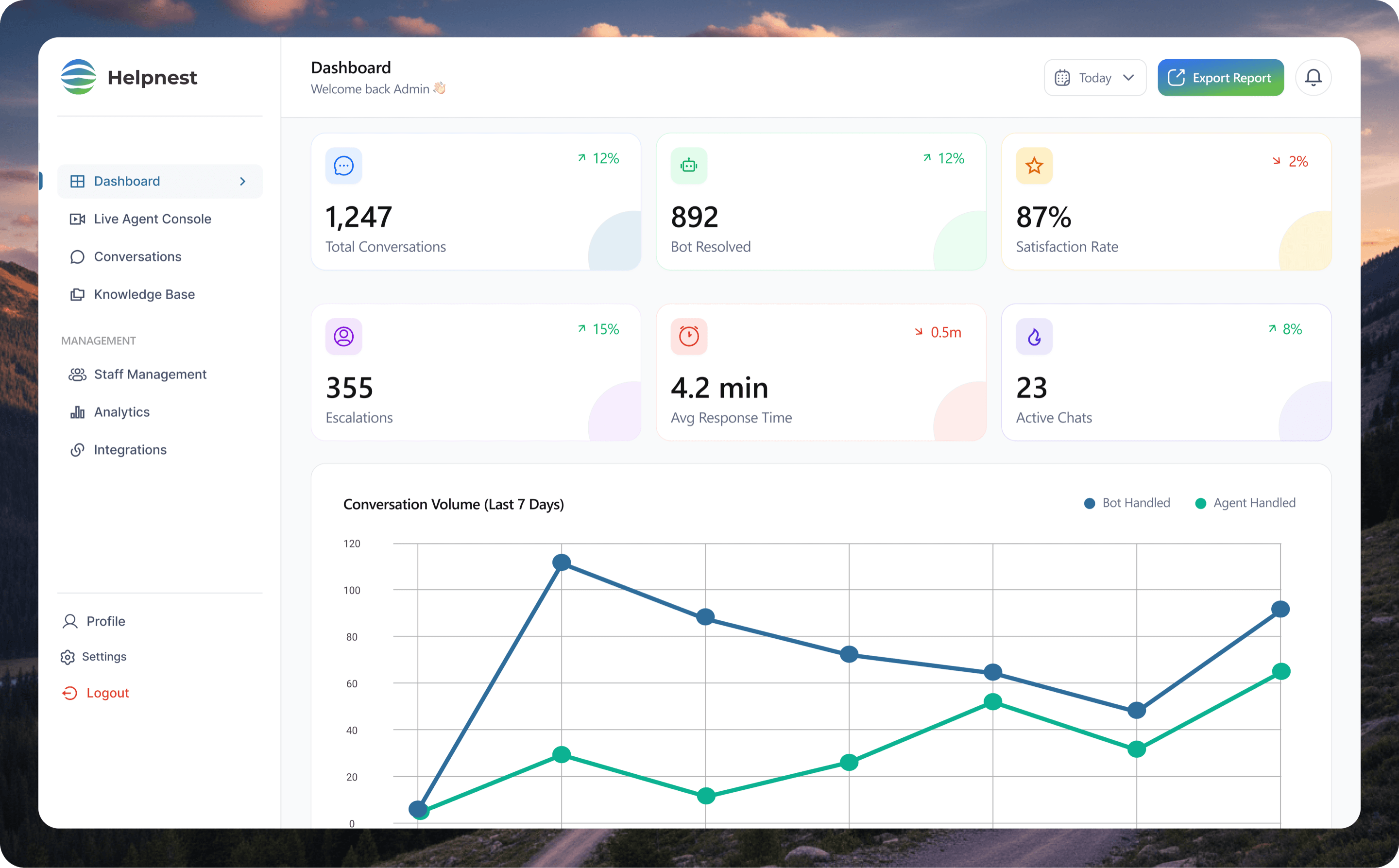
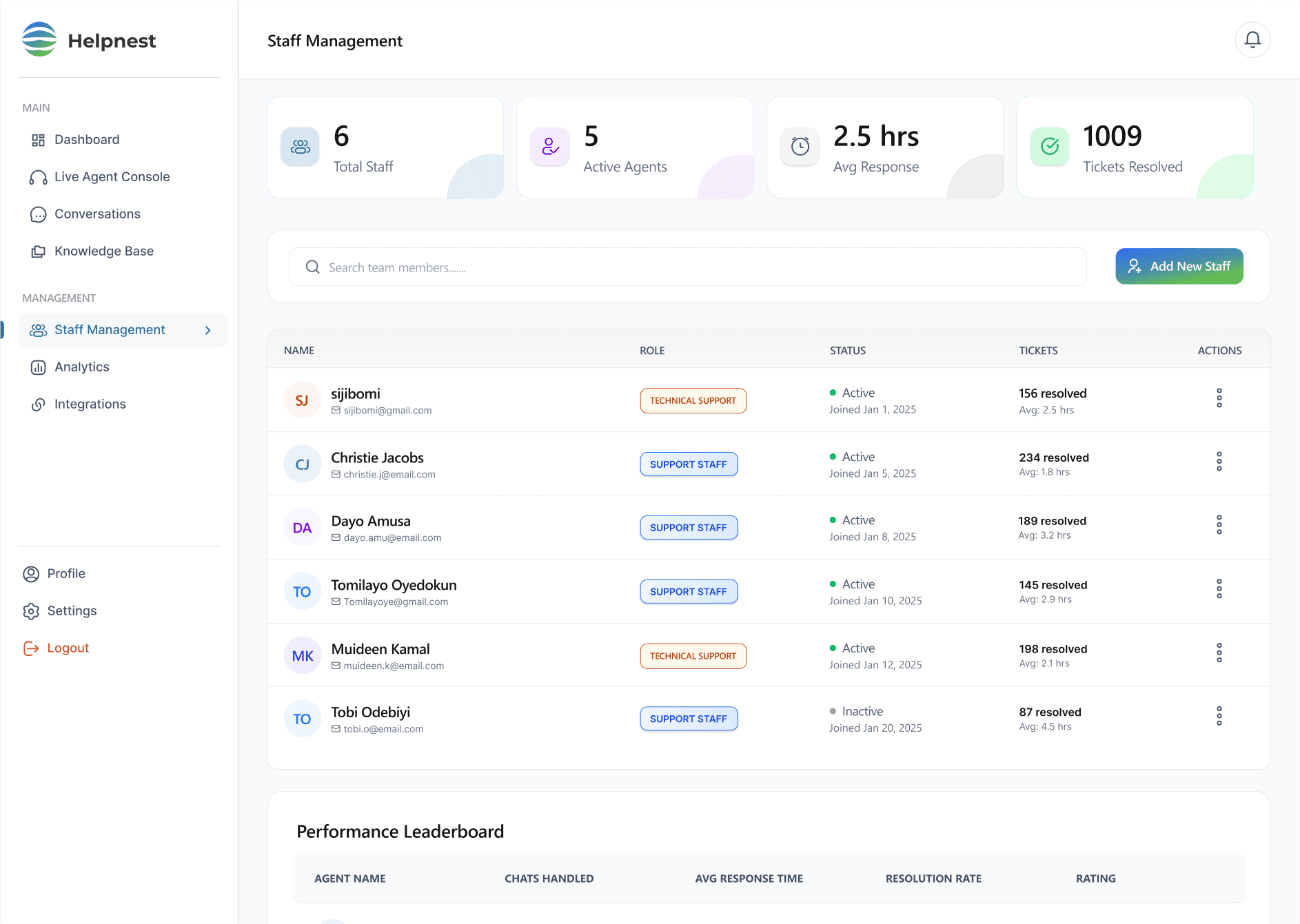
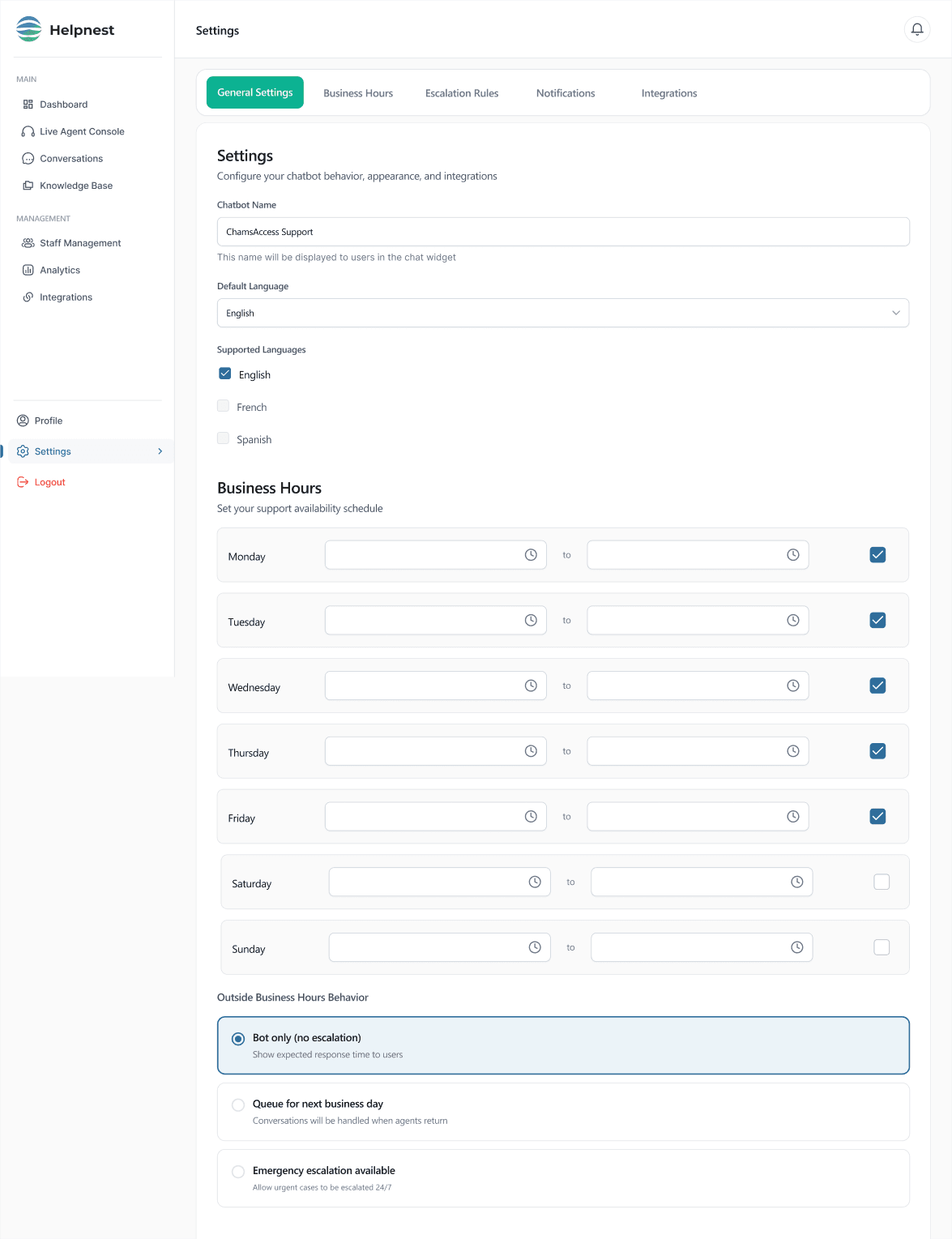
Inbox, analytics, knowledge base, staff and settings share one layout, one stat-row pattern and one set of status badges, so moving between them never means relearning.
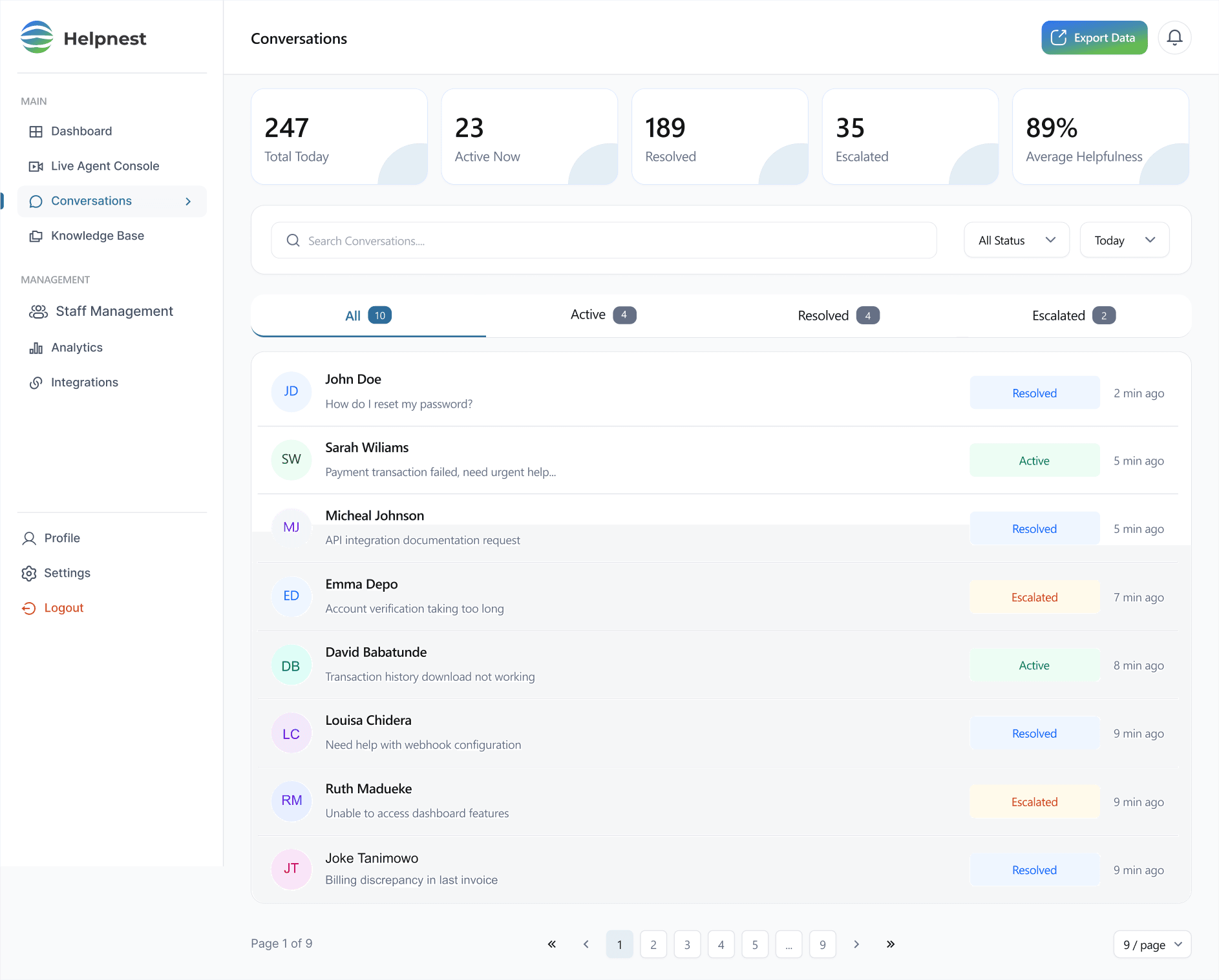
1An operational read first
Five numbers summarise the day before any thread is opened.
2Four tabs, one inbox
All, Active, Resolved and Escalated filter the same list, each with a count.
Design system
Calm authority, legible under pressure.
Typography
Segoe UI
Display · 400 weight · readable in under a second
Support agents work at speed, so every label, status and action has to read at a glance. One calm blue carries actions and data; amber and red are kept for what needs attention.
Palette
- Primary#2F6D9B · Actions, data
- Background#FFFFFF · Page
- Amber#F79009 · Attention, medium priority
- Red#F04438 · High priority, failure
Status, never colour alone
- Resolved
- Medium
- High
Actions
06Outcome
What shipped.
30+
Dashboard screens
From the main dashboard and live agent console through history, inbox, analytics, knowledge base, staff and settings.
2
Views, one system
Admin and Super-admin dashboards, sharing one layout, stat-row pattern and badge language.
8
Surfaces, one workspace
Every surface an agent or manager needs, arranged so the bot-to-human handoff never loses context.